
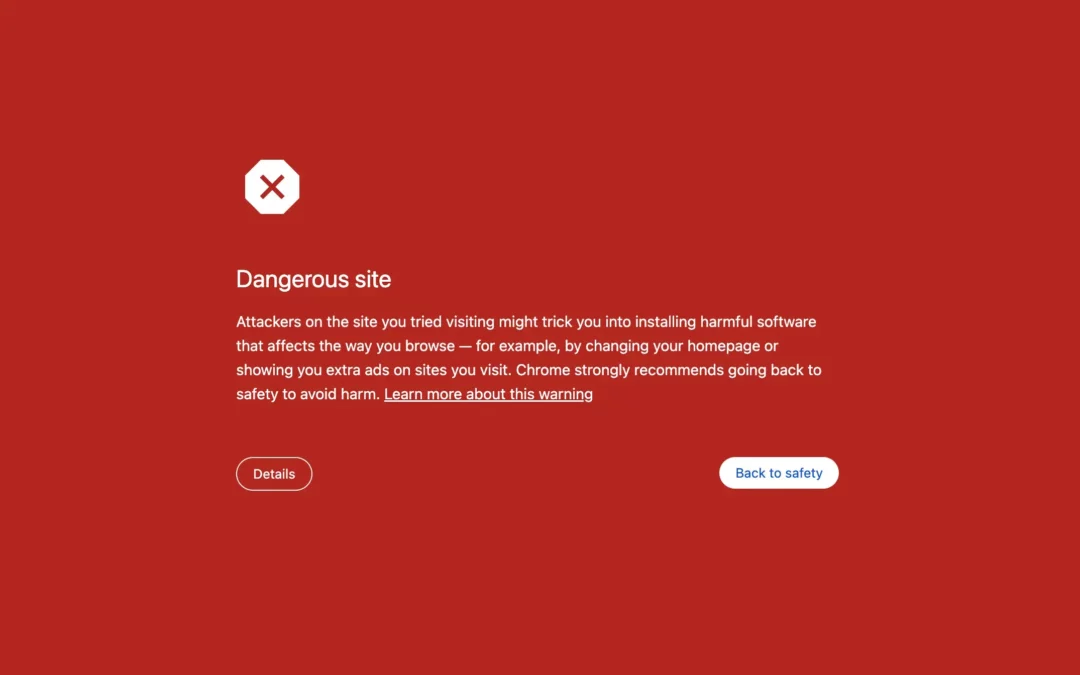
Are you seeing the same bright red “Dangerous Site” warning shown above in Google Chrome?
That recently happened to one of our clients. Within a week of launching their new PPC campaign, we observed a significant decline in visitor traffic in Google Analytics. Then came the dreaded “Dangerous Site” warning, which we later found out was linked to https://simplecopseholding.com. We notified our client ASAP and intervened before the issue caused long-term damage to their brand and SEO.
Below is what we did to fix harmful links for a “Dangerous Site.” If you’re facing this or similar WordPress issues, such as laravel-janet JavaScript, contact us today for help removing them! You can also check our FAQ for answers to common questions we’ve received.
Step 1: Confirm the Error

The first thing we did was confirm the Google alert details, since the site had been flagged for malicious links.
We opened the developer tools in Chrome and checked the network activity. One line stood out:
https://simplecopseholding.com
A known malicious URL was the culprit.
Step 2: Trace the Root Cause
We searched through the WordPress directories, including wp-content, root files, database entries, and theme folders. Nothing suspicious.
So, if the malicious URL wasn’t hard-coded, it had to be dynamically generated by a script buried deep somewhere in the site.
Step 3: Find the Alias

Back to Chrome DevTools we went. This time, we hunted for the exact function calling the malicious script. After some deep searching, we found it: hexagoncontrail-js. If you’re tracing it on your end, the JavaScript might have a different name.
Step 4: Locate the Corresponding wp_enqueue_script Function
In WordPress, all scripts are enqueued through a PHP function. We suspected the simplecopseholding link was too.
We downloaded the full WordPress instance and ran a project-wide search in Visual Studio Code. Sure enough, we found the script name buried in a plugin called either-interopable-blob. This file shouldn’t have been there. On other websites, this file may exist in a different file format, such as a theme file.
Step 5: Remove the Malicious Plugin (or File)
We checked the plugin list inside the WordPress admin, expecting to find it. We didn’t. That’s because the malware was hidden from the dashboard UI.
So, we connected directly to the plugin directory via FTP, and there it was, sitting in the plugins folder. We confirmed it wasn’t core to the website and immediately deleted it. After removing these files, make sure to review your WordPress directory and server for other suspicious files and folders. You may want to run WordFence to catch obvious issues (we’ve found it unhelpful for identifying and removing more complex viruses).
Step 6: Report the Changes to Google

Once the site was clean, we requested a review from Google, detailing every step we took. Within a couple of days, the “Dangerous site” designation was lifted, and traffic started returning the same day. We got lucky this time, though.
What This Means for Business Owners
If you’re managing your own hosting or using a DIY approach on WordPress, be extremely cognizant of security. Modern malware is sophisticated and can hide deep within your website, potentially damaging your brand at any time.
Additionally, malware fixes are not always immediate. By the time you resolve it, you may have already suffered in SEO, ad performance, and reputation. There’s also a review period, which can take weeks for Google to evaluate your site and determine whether the “Dangerous site” tag can be removed.
Before another hosting issue arises, consider using a reliable website hosting solution.
The Bottom Line
A website flagged by Google Chrome as dangerous not only loses clicks, but also customers. Don’t let links like https://simplecopseholding.com or JavaScripts like laravel-janet affect your business; resolve them using the steps above.
At Uplancer, we help businesses safeguard their digital brand. From WordPress maintenance to security audits, our team ensures your site stays secure, visible, and trusted by both Google and other search engines, as well as your customers.
If you’re still seeing a “Dangerous site” warning, contact us for a comprehensive site security audit and technical cleanup to resolve it today.
Frequently Asked Questions
Get answers to questions about removing harmful links from your WordPress site below.
What else I can I be doing to protect my website?
The first thing is to back up your server at least every 3 months. What this does is three things:
- You can troubleshoot more effectively by comparing clean code from before with the currently infected code.
- You can quickly roll back your site to remove any penalties imposed by search engines.
- You buy yourself time for WordPress and plugin providers to patch their services, preventing this from happening again.
The second is to reset passwords for all your users. Bad actors can use these credentials to inject and initiate malware stored on your server.
The third is to enable automatic updates. With the abuse of AI, bad actors can exploit vulnerabilities quickly. That also means WordPress and other services can quickly protect and patch their software from these threats.
The final is to work with us 🙂
How did the malicious links get onto the site in the first place?
There are many routes, such as outdated plugins, a poorly patched website, a server security flaw, or something else entirely.
How do I know if I removed the dangerous links completely?
You can open up your developer tools and search for the malicious script. For instance, searching laravel-janet would result in not found, indicating the link has been removed from your website.
Can this keep happening?
It might. That’s why you’ll need to be diligent and remove malware as soon as you identify one.
What happens if this keeps happening?
You may be dealing with a virus that has infected multiple files on your server. The longer you wait to treat the virus, the more files will get infected. Unfortunately, viruses are sometimes impossible to remove, so rebuilding your website on a new server may be your only option. Contact us if you need help making this call.